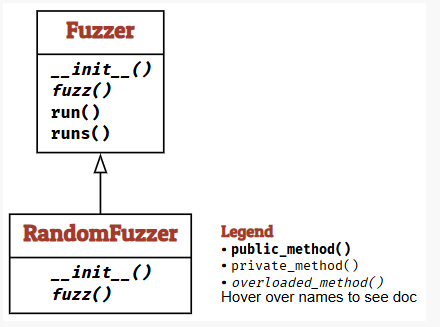
Fuzzer is a base class for fuzzers, with RandomFuzzer as a simple instantiation. The fuzz() method of Fuzzer objects and returns a string with a generated input.
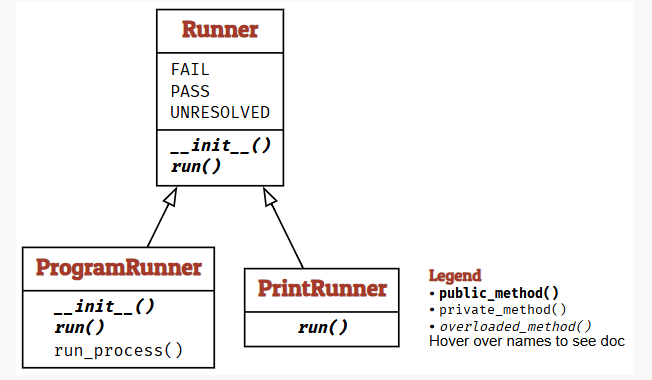
A Fuzzer can be paired with a Runner which takes the fuzzed strings as input. Its result is a class-specific status and an outcome (PASS, FAIL, or UNRESOLVED). A PrintRunner will simply print out the given input and return a PASS outcome:
A ProgramRunner will feed the generated input into an external program. Its result is a pair of the program status (a CompletedProcess instance) and an outcome (PASS, FAIL or UNRESOLVED):
Fuzzing was created in the Fall of 1988. While sitting in his apartment in Wisconsin, Madison, professor Barton Miller was connected to his university computer via a 1200 baud telephone line. The thunderstorm caused noise on the line, and this noise in turn caused the UNIX commands on either end to get bad inputs and crash. He wanted to investigate the extent of the problem and its causes. So he made a programming exercise for his students at the University of Wisconsin-Madison. This exercise would have his students create the first fuzzers.
The goal of this project is to evaluate the robustness of various UNIX utility programs, given an unpredictable input stream. […] First, you will build a fuzz generator. This is a program that will output a random character stream. Second, you will take the fuzz generator and use it to attack as many UNIX utilities as possible, with the goal of trying to break them.
This assignment captures the essence of fuzzing: Create random inputs, and see if they break things. Just let it run long enough, and you’ll see.
A Simple Fuzzer
Let’s build a fuzz generator. The idea is to produce random characters, adding them to a buffer string variable (out), and finally returning the string.
This implementation uses the following Python features and functions:
random.randrange(start, end) - return a random number [start, end)
range(start, end) – create an iterator (which can be used as a list) with integers in the range [start, end).
for elem in list: body – execute body in a loop with elem taking each value from list.
for i in range(start, end): body – execute body in a loop with i from start to end — 1.
chr(n) – return a character with ASCII code n
Here is the actual fuzzer() function:
def fuzzer(max_length: int=100, char-start: int=32, char_range: int=32) ->str:"""A string of up to `max_length` characters in the range [`char_start`, `char_start` + `char_range`]""" string_length = random.randrange(0, max_length +1) out =""for i inrange(0, string_length): out +=chr(random.randrange(char_start, char_start + char_range))return out
With its default arguments, the fuzzer() function returns a string of random characters:
Let’s invoke an external program with fuzzed inputs. First, we create an input file with fuzzed test data; then we feed this input file into a program of choice.
Let’s open it. The Python open() function opens a file into which we can then write arbitrary contents. Very commonly, it is used with the with statement, which ensures that the file is closed as soon as it is no longer needed.
data = fuzzer()withopen(FILE, "w") as f: f.write(data)
With that input file, we can invoke a program on it.
We will use the bc calculator program, which takes an arithmetic expression and evaluates it.
To invoke bc let’s use the Python subprocess module. This is how it works:
program ="bc"withopen(FILE, "w") as f: f.write("2 + 2\n")result = subprocess.run([program, FILE],stdin=subprocess.DEVNULL,stdout=subprocess.PIPE,stderr=subprocess.PIPE,universal_newlines=True)
Using result, we can check the program’s output. In the case of bc, this is the result:
result.stdout
Output: 4\n
The status may also be checked, a value of 0 indicating the program terminated correctly.
result.returncode
Output: 0
Any error messages would be available in results.stderr:
results.stderr
Output: ''
Any program is able to go through this process, however, you should be careful as you could change or even damage your system.
Bug Fuzzers Find
When Miller and his students ran their first fuzzers in 1989, they found an alarming result: About A third of the UNIX utilities they fuzzed had issues — they crashed, hung, or otherwise failed when confronted with fuzzing input. This also included the bc program above.
Because many of these UNIX utilities were used in scripts that would also process network input, this was a potential hazard, one which need fuzzers to fix.
Buffer Overflows
Buffer overflows are triggered when going over a program’s built-in maximum lengths for inputs and input elements.
Buffer overflow behavior can be easily simulated in a Python function:
trials =100with ExpectError():for i inrange(trials): s = fuzzer() crash_if_too_long(s)
Output: Traceback (most recent call last): File "/var/folders/n2/xd9445p97rb3xh7m1dfx8_4h0006ts/T/ipykernel_1932/292568387.py", line 5, in <module> crash_if_too_long(s) File "/var/folders/n2/xd9445p97rb3xh7m1dfx8_4h0006ts/T/ipykernel_1932/2784561514.py", line 4, in crash_if_too_long raise ValueError ValueError (expected)
The with ExpectError() line in the above code ensures that the error message is printed, yet execution continues; this is to differentiate this “expected” error from “unexpected” errors in other code examples.
Missing Error Checks
Many programming languages do not have exceptions, but instead have functions return special error codes in exceptional circumstances. The C function getchar(), for instance, normally returns a character from the standard input; if no input is available anymore, it returns the special value EOF(end of file).
In a situation where, for example, getchar() reaches and scans a space character, getchar() could return EOF, and keep returning EOF when called again. This would lead to an infinite loop. However, if a line with the with ExpectTimeout() was implemented, the code would be interrupted after a set amount of time, printing an error message.
Rogue Numbers
When fuzzing, it is easy to generate uncommon values in the input, which can lead to a load of interesting behavior. The value could exceed program memory, lead to a crash, or an array of other unexpected outcomes.
It is important to use these rogue numbers because it is much better to quickly fail the program than to allow it to destroy something later down the line.
Catching Errors
Fuzzing also needs checks for failures that do not cause obvious crashes.
Generic Checkers
Generic checkers detect common problems. For example, AddressSanitizer detects invalid memory accesses in C and C++ programs. Outputs can also be checked for leaked secret information.
Program-Specific Checkers
Program-specific checkers use assertions to verify rules about a program’s data or results. The chapter’s airport-code example checks for three uppercase letters. Here is a simplified version:
def check_airport_code(code):assertlen(code) ==3, "Expected three characters"assertall(c.isalpha() and c.isupper() for c in code), "Expected uppercase letters"for code in ["JFK", "jfK"]:try: check_airport_code(code)print(code, "PASS")exceptAssertionErroras error:print(code, "FAIL:", error)
JFK PASS
jfK FAIL: Expected uppercase letters
JFK passes both checks. jfK fails because it contains lowercase letters.
Static Code Checkers
Static checkers inspect code without running it. For example, mypy can detect type mismatches, but it cannot check every program-specific rule.
A Fuzzing Architecture
The classes introduced above separate two responsibilities: Fuzzer creates inputs, and Runner handles them and classifies the results.
run() sends one generated input to a runner, while runs() repeats the process. This separation lets us reuse a generator with different targets.
A runner reports PASS, FAIL, or UNRESOLVED. Passing means its checks found no failure; it does not prove correctness. UNRESOLVED means the runner could not judge the result.
Lessons Learned
Randomly generating inputs (i.e., “fuzzing”) is a simple, cost-effective way to quickly test arbitrary programs for their robustness.
Bugs fuzzers find are mainly due to errors and deficiencies in input processing.
To catch errors, have as many consistency checkers as possible.
NoteOpen-Source Tool for Software Engineers
Our team built FuzzerCheck, a Python command-line tool that demonstrates random fuzzing using two examples adapted from the chapter. It generates inputs, reports passing and failing trials, and displays sample failing inputs.
Unless otherwise noted, the source code segments in this article are excerpted directly from the Fuzzing Book. The authors of this online book licensed the source code and its written content under the BY-NC-SA 4.0 Creative Commons License. More details about the license for the Fuzzing Book are available in the The Fuzzing Book License.